KMP - Artifacts
You press Build once. Three different things appear.
The hello world article ended with one of them: Greetings.framework, the bundle the macOS app links against. This article opens the build and shows all three: the klib (a Kotlin library in the compiler’s own format), the framework (a bundle of machine code plus the files that describe it), and the XCFramework (a package that holds frameworks for several platforms). Kotlin Multiplatform (KMP) is the tooling that produces them. The project is the same greetings library from the hello world article, available at github.com/dushyant30suthar/KMP-Themissingintroduction. Every command and every output below is real.
1. One build, three layers
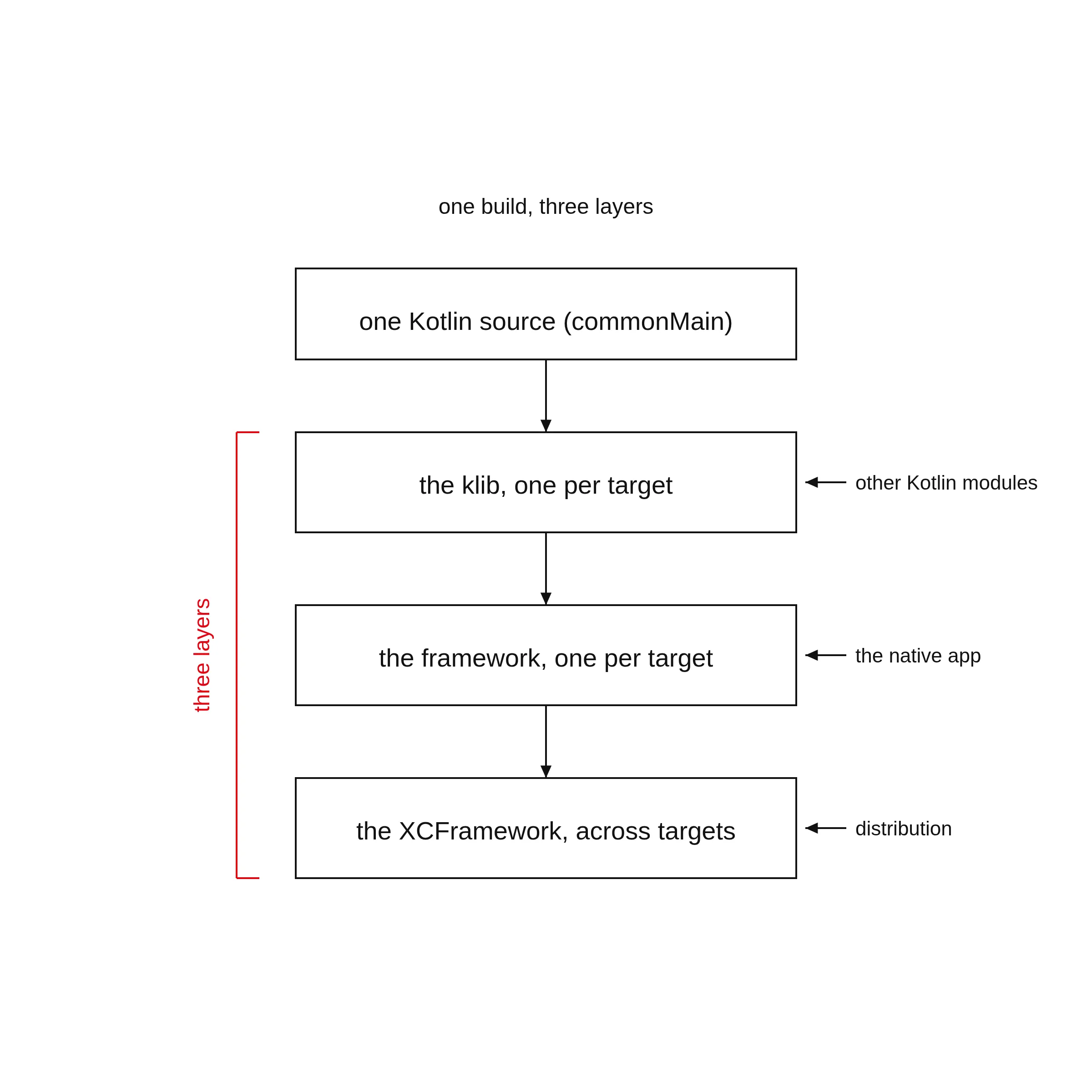
The claim: a KMP build produces layers, not one file. Each layer is consumed by the next.
Run the build from the project root:
./gradlew clean :greetings:buildThis run happened on a Linux machine, not a Mac. A task is a named unit of work in the build. Read the task names in the output (trimmed):
> Task :greetings:compileKotlinMacosArm64
> Task :greetings:macosArm64MainKlibrary
> Task :greetings:linkDebugFrameworkMacosArm64 SKIPPED
> Task :greetings:linkReleaseFrameworkMacosArm64 SKIPPED
> Task :greetings:macosArm64Test SKIPPED
> Task :greetings:build

BUILD SUCCESSFUL in 2s
compileKotlinMacosArm64 ran. The two link...FrameworkMacosArm64 tasks skipped. The host (the machine that runs the build) decides this. The klib compiles on any host. The framework links only on a macOS host, because the link step needs the Apple SDK. If you build on a Mac, the link tasks run and the framework appears. The hello world article shows the same command on a Mac.
The build also prints this warning on the Linux run:
w: ⚠️ Native task 'macosArm64Test' is disabled
Task 'macosArm64Test' for target 'macos_arm64' cannot run on the current host (linux_x64).
Reason: tests can only run on macos_arm64
Solution: To suppress this warning, add 'kotlin.native.ignoreDisabledTargets=true' to gradle.properties.
Where the artifacts land:
- The klib, exploded (a directory form):
greetings/build/classes/kotlin/macosArm64/main/klib/greetings/ - The klib, zipped:
greetings/build/libs/greetings-macosArm64Main.klib, made by the:greetings:macosArm64Klibtask - The framework, on a Mac:
greetings/build/bin/macosArm64/releaseFramework/Greetings.framework
2. The klib: a Kotlin library for one target
A native target compiles to a klib by default. The plugin creates no production binary unless you declare one. The framework exists in this project because the build file declares it. Section 3 shows the declaration.
A klib is a zip (a compressed archive). Open the real one:
unzip -l greetings/build/libs/greetings-macosArm64Main.klibThe output (trimmed):
Archive:  greetings/build/libs/greetings-macosArm64Main.klib
  Length      Date    Time    Name
---------  ---------- -----   ----
        0  02-01-1980 00:00   default/
      301  02-01-1980 00:00   default/manifest
        0  02-01-1980 00:00   default/ir/
      120  02-01-1980 00:00   default/ir/irDeclarations.knd
      416  02-01-1980 00:00   default/ir/strings.knt
        0  02-01-1980 00:00   default/linkdata/
       92  02-01-1980 00:00   default/linkdata/module
        0  02-01-1980 00:00   default/targets/
        0  02-01-1980 00:00   default/targets/macos_arm64/
---------                     -------
     1615                     29 files
The ir/ files hold the code in IR (intermediate representation, the compiler’s internal form of the code). The manifest (the file that names what the package holds) says:
unzip -p greetings/build/libs/greetings-macosArm64Main.klib default/manifestabi_version=2.4.0
builtins_platform=NATIVE
compiler_version=2.4.10
depends=stdlib
ir_signature_versions=1,2
language_features=+ExportKDocDocumentationToKlib +MultiPlatformProjects
metadata_version=2.4.0
native_targets=macos_arm64
short_name=greetings
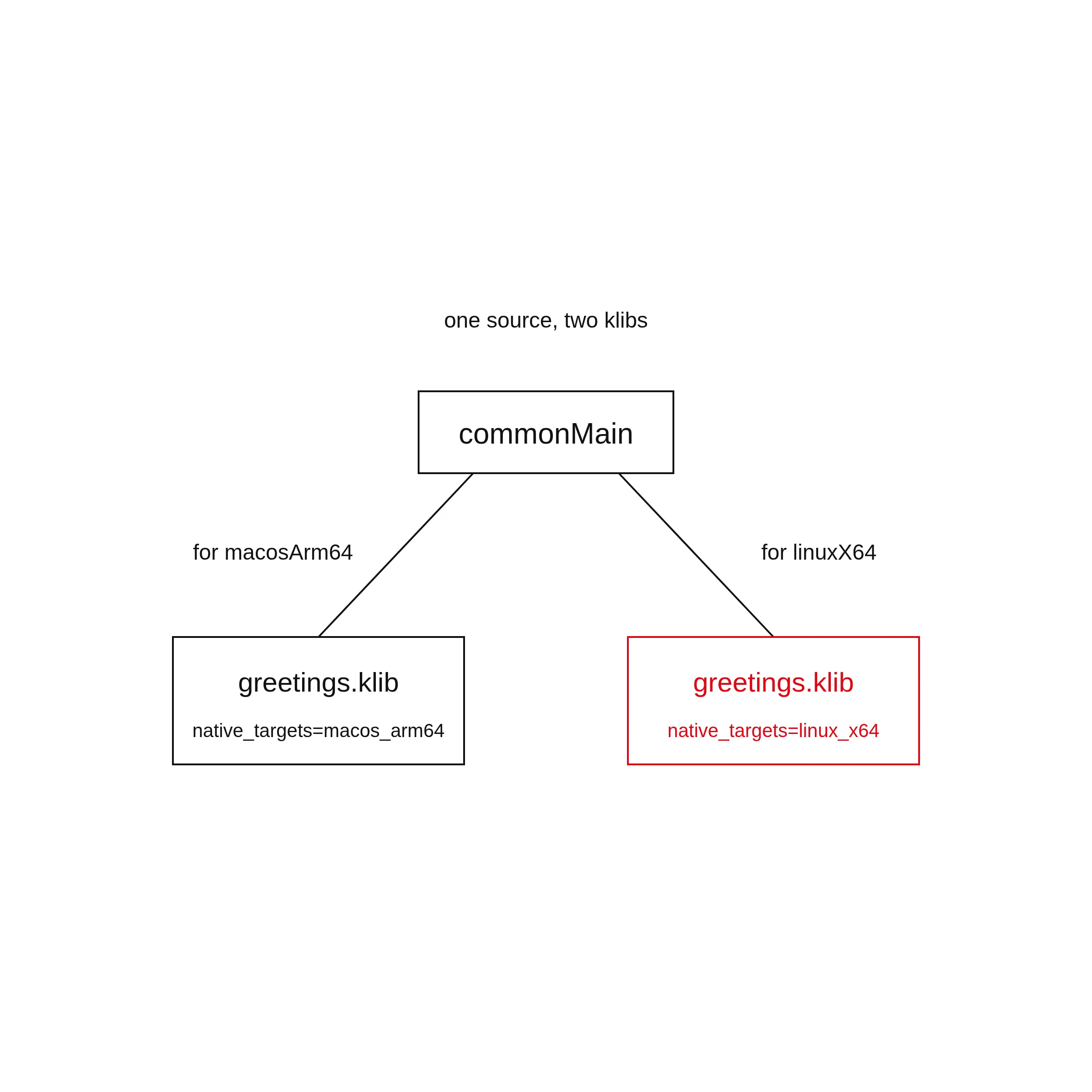
unique_name=KMP-Themissingintroduction\:greetingsThe line native_targets=macos_arm64 is the klib naming its target. A klib is per target. The experiment added a second target, linuxX64, to the same source and rebuilt.
The output (trimmed):
> Task :greetings:compileKotlinMacosArm64
> Task :greetings:macosArm64MainKlibrary
> Task :greetings:linkDebugFrameworkMacosArm64 SKIPPED
> Task :greetings:linkReleaseFrameworkMacosArm64 SKIPPED
> Task :greetings:compileKotlinLinuxX64
> Task :greetings:linuxX64MainKlibrary
> Task :greetings:linkDebugStaticLinuxX64
> Task :greetings:linkReleaseStaticLinuxX64
> Task :greetings:build

BUILD SUCCESSFUL in 9s
Two klibs, one per target. The linuxX64 manifest differs in exactly one line: native_targets=linux_x64.
Who consumes a klib? Kotlin/Native itself, as a dependency. Another Kotlin module compiles against it. The link step reads it to produce the final binary. The operating system never sees a klib.
Why can a Linux machine compile a klib for an Apple target? The Kotlin/Native prebuilt (the compiler package downloaded for your machine) for Linux ships platform klibs for every target, Apple targets included. The front end (the part of the compiler that reads the source) needs those files to compile. The link step needs the Apple SDK. That is why the link tasks skip.
3. The framework: the machine’s view of the library
The klib is the compiler’s view. The framework is the machine’s view. The build file declares the framework:
kotlin {
    macosArm64().binaries.framework {
        baseName = "Greetings"
        isStatic = true
    }
framework is available for Apple targets only: macOS, iOS, watchOS, tvOS. isStatic = true makes the binary a static archive (a file that packs machine code for the linker, the tool that joins code into a program).
The link step reads the klib, produces machine code, and wraps it in a bundle (a folder of files that act as one unit). The real bundle from the project, the one the hello world app links against:
ls -la apps/apple/greetings/greetings/Greetings.frameworklrwxrwxrwx. 1 dushyant30suthar dushyant30suthar 26 Sep 16 02:25 Greetings -> Versions/Current/Greetings
lrwxrwxrwx. 1 dushyant30suthar dushyant30suthar 24 Sep 16 02:25 Headers -> Versions/Current/Headers
lrwxrwxrwx. 1 dushyant30suthar dushyant30suthar 24 Sep 16 02:25 Modules -> Versions/Current/Modules
lrwxrwxrwx. 1 dushyant30suthar dushyant30suthar 26 Sep 16 02:25 Resources -> Versions/Current/Resources
drwxr-xr-x. 1 dushyant30suthar dushyant30suthar 16 Sep 16 02:25 VersionsThe top-level names are links into Versions/A/. Four things live in the bundle: the binary, the headers, the module map, the Info.plist.
The binary. file asks what it is:
file apps/apple/greetings/greetings/Greetings.framework/Greetingsapps/apple/greetings/greetings/Greetings.framework/Greetings: symbolic link to Versions/Current/GreetingsThe top-level name is a link. The real file sits under Versions/A/:
file apps/apple/greetings/greetings/Greetings.framework/Versions/A/Greetingsapps/apple/greetings/greetings/Greetings.framework/Versions/A/Greetings: current ar archive random libraryA static archive of machine code for macOS on Apple Silicon (Apple’s own CPU design). The linker joins it into the app. Nothing loads at runtime.
The header. This is the API Swift sees. From Greetings.h:
__attribute__((objc_subclassing_restricted))
__attribute__((swift_name("Greetings")))
@interface GreetingsGreetings : GreetingsBase
- (instancetype)init __attribute__((swift_name("init()"))) __attribute__((objc_designated_initializer));
+ (instancetype)new __attribute__((availability(swift, unavailable, message="use object initializers instead")));
- (NSString *)greet __attribute__((swift_name("greet()")));
@end
Objective-C (the C-based language macOS apps use) sees the class GreetingsGreetings: the framework name as a prefix, plus the class name. The swift_name attribute tells Swift to see the class as Greetings. That is why the app calls Greetings().greet().
The module map. This file tells the compiler where the module’s headers live:
framework module "Greetings" {
    umbrella header "Greetings.h"

    export *
    module * { export * }

    use Foundation
}
The umbrella header (the one header that covers the whole module) is Greetings.h. import Greetings in Swift resolves through this file.
The Info.plist (the bundle’s description file) declares the bundle’s type, version, and platform:
    <key>CFBundlePackageType</key>
    <string>FMWK</string>
    <key>CFBundleShortVersionString</key>
    <string>1.0</string>
    <key>CFBundleSupportedPlatforms</key>
    <array>
        <string>MacOSX</string>
    </array>
4. One architecture per framework: the XCFramework
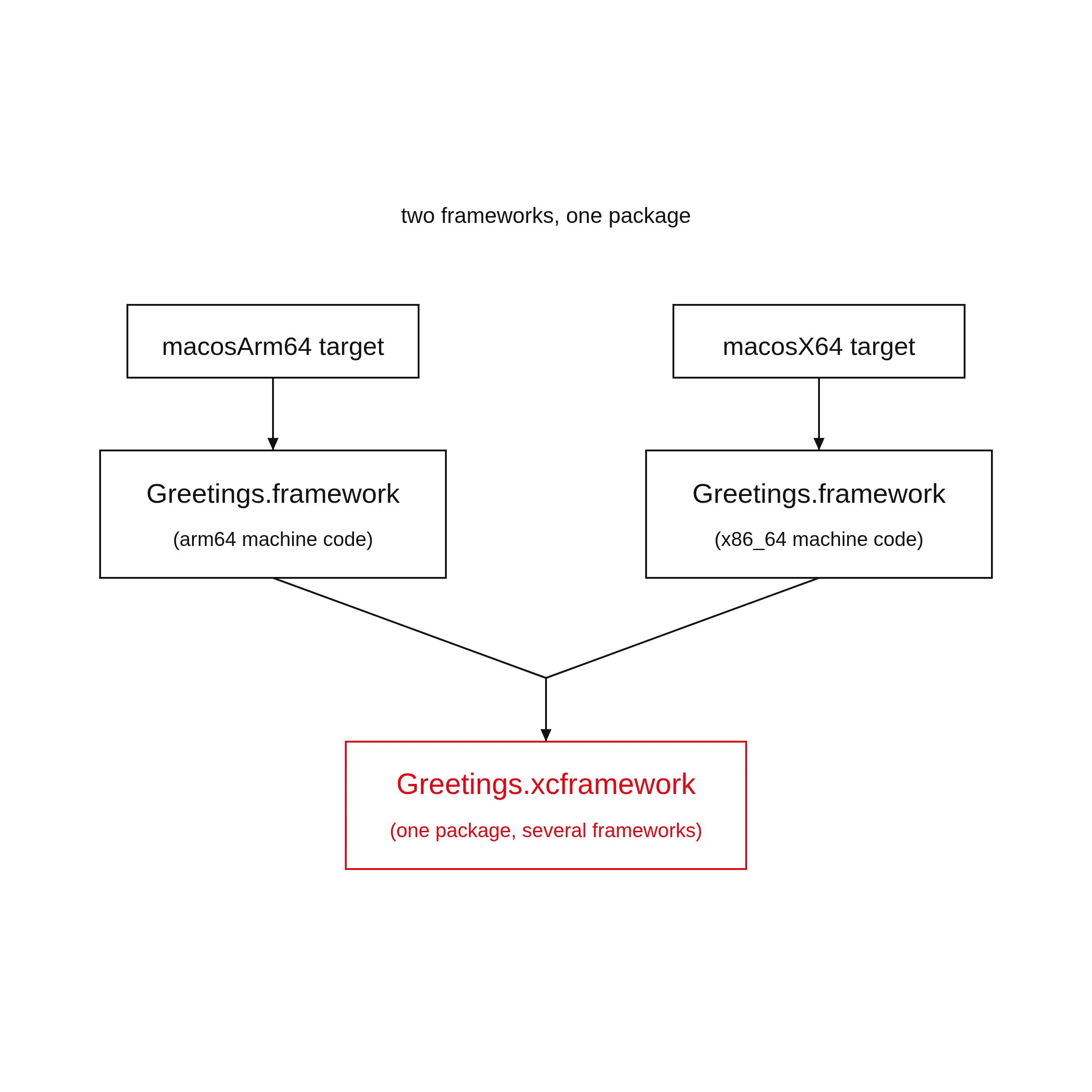
A framework holds one architecture (the kind of CPU, for example arm64). The macosArm64 framework runs only on Apple Silicon. If the library must reach more CPUs, one framework is not enough.
Apple’s answer is the XCFramework. From Apple’s docs: “An XCFramework bundle, or xcframework, is a binary package created by Xcode that includes the frameworks and libraries necessary to build for multiple platforms (iOS, iPadOS, macOS, tvOS, visionOS, watchOS, and DriverKit), including Simulator builds.”
The Kotlin Gradle plugin builds the XCFramework for you. You declare it and add each target’s framework to it:
import org.jetbrains.kotlin.gradle.plugin.mpp.apple.XCFramework

plugins {
    kotlin("multiplatform") version "2.4.20"
}

kotlin {
    val xcf = XCFramework()
    val iosTargets = listOf(iosArm64(), iosSimulatorArm64())

    iosTargets.forEach {
        it.binaries.framework {
            baseName = "shared"
            xcf.add(this)
        }
    }
}
The plugin registers a task per framework, for example assemble<Framework name>ReleaseXCFramework. Running the task writes the bundle to the module’s build directory, under XCFrameworks/release/.
For this project, the multi-arch pair is macosArm64 plus macosX64 (the Intel Mac target). One note: the Kotlin docs list macosX64 as deprecated (marked for removal in a future release) as of Kotlin 2.3.20. The docs’ own examples pair iosArm64 with iosSimulatorArm64, the device and the simulator (a program that imitates a device on your machine). That pair is the standard case.
5. How they fit together
The chain, one more time:
- The klib: another Kotlin module takes it. The link step takes it.
- The framework: the native app takes it.
- The XCFramework: distribution takes it. SwiftPM (Swift’s package manager) and CocoaPods (a package manager for Apple platforms) ship it as a zip.
The target decides the artifact. Change the target, and the same source compiles to that platform’s own files. Kotlin is the language. The artifact is what the platform already understands.