KMP - SDK packaging
One line in the build file changes what the app contains.
The artifacts article opened the build and showed its layers: the klib (the compiler’s own library format), the framework (a bundle an app links against), and the XCFramework (a package that holds frameworks for several platforms). This article covers the last step: how the final binary links into the consuming app. The axis: does the code go into the app at build time, or does the platform load it at runtime (when the app runs)? Apple answers with a flag. The web answers with imports. The project is the same greetings library from the hello world article, at github.com/dushyant30suthar/KMP-Themissingintroduction. Every command and every output below is real.
1. One flag, two ways to link
The greetings build file makes the choice in one property:
kotlin {
    macosArm64().binaries.framework {
        baseName = "Greetings"
        isStatic = true
    }
}
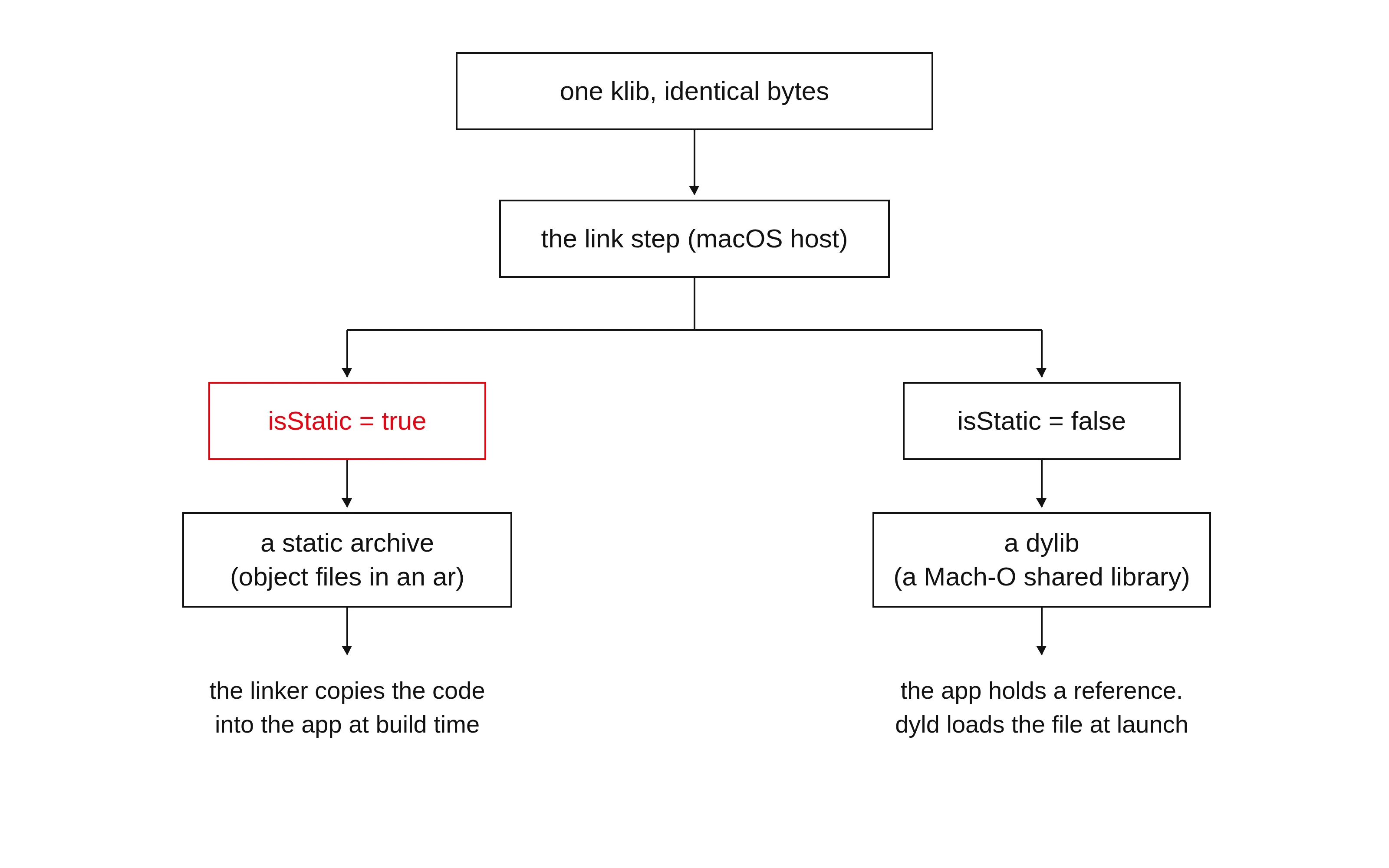
isStatic decides which kind of framework the link step produces. In this project’s Kotlin version (2.4.10), the default is false: a framework is dynamic unless the build file says otherwise. Greetings sets true on purpose. The Kotlin Gradle Plugin source says so in one line:
/**
 * Specifies if the framework is linked as a static library (false by default).
 */
var isStatic = false
The flag does not touch the compile step. The build produced the same klib for all three settings (true, unset, false):
16ec71d7d619b9f4d9b09eef36458aa36faee2684bbc53bfbe5cfd1d0990f3e1  greetings/build/libs/greetings-macosArm64Main.klib
16ec71d7d619b9f4d9b09eef36458aa36faee2684bbc53bfbe5cfd1d0990f3e1  greetings/build/libs/greetings-macosArm64Main.klib
16ec71d7d619b9f4d9b09eef36458aa36faee2684bbc53bfbe5cfd1d0990f3e1  greetings/build/libs/greetings-macosArm64Main.klib
Three settings, one klib. The flag decides the link step, not the compile step. On this Linux host the link step skips: it needs a macOS host and the Apple SDK (Apple’s header and library set).
> Task :greetings:linkDebugFrameworkMacosArm64 SKIPPED
> Task :greetings:linkReleaseFrameworkMacosArm64 SKIPPED
Apple systems use the Mach-O binary format. The two ways to link:
2. Static: the code goes into the app
Open the committed Greetings.framework binary. A framework holds its machine code in a file named after the framework. Here it is a static archive (an ar archive, a plain container of object files). An object file holds the machine code for one source file:
$ file apps/apple/greetings/greetings/Greetings.framework/Versions/A/Greetings
apps/apple/greetings/greetings/Greetings.framework/Versions/A/Greetings: current ar archive random library

$ ar t apps/apple/greetings/greetings/Greetings.framework/Versions/A/Greetings
Greetings.framework.o
One member, Greetings.framework.o: the object file with all the compiled code. Apple’s documentation names the shape: “A static framework is a framework bundle whose main binary is a static archive.” The client’s main binary is “already statically linked into the client.”
The static linker is the tool that combines object files into the final product. It adds the archive’s code to the app at build time. After the build, the app binary contains the Kotlin code. Nothing else happens. There is no framework file to embed at runtime, nothing to sign, nothing for the operating system to find at launch.
The cost is size and duplication. Every app that links the framework carries a copy of the code. The app binary grows. The linker drops the objects it does not use, but the rest stays. For one app, that is the right trade: one fewer moving part.
3. Dynamic: the app points at the code
Set isStatic = false. The link step then produces a dylib (a dynamically linked library) instead of an archive. The klib is unchanged. Only the link output differs. This host cannot run the link step, so the built binary was not obtained here. needs human: build greetings with isStatic = false on macOS and run file on the framework binary to confirm it reports a Mach-O dynamically linked shared library.
Apple’s build settings reference names the two Mach-O types:
Dynamic Library: Dynamic libraries are linked at build time and loaded automatically when needed. [mh_dylib]
Static Library: Static libraries are linked at build time and loaded at execution time. [staticlib]
Read the first line again. “Linked at build time”: the app records a reference to the library. “Loaded automatically when needed”: the operating system reads the library file at launch. Apple’s Mach-O documentation: dynamic shared libraries are “files that contain modules of reusable executable code that your application references dynamically and that are loaded by the dynamic linker when the application is launched.” The dynamic linker is dyld, a special library at /usr/lib/dyld that the kernel starts with every program.
So the app binary holds a reference, not the code. The framework file travels with the app, inside the app bundle, and dyld reads it at launch. needs human: on macOS, confirm that the app bundle’s Frameworks/ directory holds the dynamic framework and that the app binary references it.
The cost is setup: the framework must be embedded in the bundle and code-signed. The payoff is sharing. One copy on disk serves several apps, and the library can be updated without rebuilding the apps. Apple’s Mach-O documentation: shared libraries are “typically used to store large amounts of code that are usable by many applications.”
4. Choosing: the default and the exception
The defaults sit on the dynamic side. The Kotlin 2.4.10 source initializes the flag to false (section 1). A print task in the build confirmed it at runtime:
> Task :greetings:printFrameworkDefaults
DEFAULT isStatic=false
Xcode agrees: a new framework target “builds a dynamic framework automatically.” You convert it by setting the Mach-O Type build setting to Static Library.
For a KMP library that one app uses, pick static. Static removes the embedded file, the signing step, and the runtime load. The code is used by one app, so duplication costs nothing. Greetings is exactly this case, which is why its build file sets isStatic = true against the plugin default.
Pick dynamic when the framework serves several apps on the machine, or when the library ships updates on its own schedule. If you face neither case, keep the flag at true.
5. The web: the same question as imports
The web has no isStatic flag. It has imports. The same axis: does the code go into the app at build time, or does the platform load it at runtime?
How a KMP web target ships. Add a js target to the build file:
js(IR) {
    browser()
}
The compile step produces a klib, like the native targets. Its manifest names the platform:
builtins_platform=JS
jsOutputName=KMP-Themissingintroduction-greetings
The link step turns the klib into the files of an npm package (the package format of the JavaScript ecosystem). The build generated the package at build/js/packages/KMP-Themissingintroduction-greetings/. Its package.json:
{
  "name": "KMP-Themissingintroduction-greetings",
  "version": "0.0.0-unspecified",
  "main": "kotlin/KMP-Themissingintroduction-greetings.js",
  "devDependencies": {},
  "dependencies": {},
  "peerDependencies": {},
  "optionalDependencies": {},
  "bundledDependencies": []
}
A published KMP library shows the same shape, filled in. The tarball (a compressed archive) of kotlinx-coroutines-core 1.7.3, a JetBrains-published KMP library, holds the module file, a source map (a file that maps output to source lines), and the metadata files (.kjsm) for other Kotlin modules. Its package.json names the module as main and declares a peer dependency (a package the consumer must provide) on the kotlin runtime, which ships once.
Now the consumer: a separate project with a js target, a nodejs environment (the Node.js runtime), an executable binary (a program, not a library), and a dependency on greetings. Its whole source:
import com.theemergentnarrative.kmpthemissingintroduction.Greetings

fun main() {
    println(Greetings().greet())
}
The build links the greetings klib into the consumer’s output:
kotlin-kotlin-stdlib.js
kotlin_org_jetbrains_kotlin_kotlin_dom_api_compat.js
KMP-Themissingintroduction-greetings.js
js-consumer.js
The greetings klib became KMP-Themissingintroduction-greetings.js at link time, next to the app code and the runtime. Node runs it:
$ node build/js/packages/js-consumer/kotlin/js-consumer.js
Hello, from Kotlin!
The greeting came from the library, compiled into the app at build time. That is the static side. The generated module is a UMD module (a format for several module systems), the default for the browser and nodejs targets per the Kotlin docs.
The dynamic side is one character: import() as a function. A static import statement resolves when the modules load, before the app body runs. A dynamic import() call resolves at the point of the call, at runtime. Two demos against the built consumer:
static-import-demo.mjs:
import './build/js/packages/js-consumer/kotlin/js-consumer.js';
console.log('app module body runs');$ node static-import-demo.mjs
Hello, from Kotlin!
app module body runsdynamic-import-demo.mjs:
console.log('app starts');
const mod = await import('./build/js/packages/js-consumer/kotlin/js-consumer.js');
console.log('module loaded');$ node dynamic-import-demo.mjs
app starts
Hello, from Kotlin!
module loadedThe static demo printed the greeting before the app body. The dynamic demo started the app first and loaded the module at the call. In a browser, a bundler (a tool that combines modules into one bundle) resolves static imports at build time and copies the module code into the app bundle. Dynamic imports stay out of the bundle and load on demand.
6. Wasm: the binary the web loads at runtime
WebAssembly (wasm) is a binary format the web runs. MDN defines it: “WebAssembly (Wasm) is a low-level assembly-like language that brings near-native performance to the web.” Kotlin compiles to it with a wasmJs target:
wasmJs {
    browser()
}
The compile step produces a klib again. Its manifest:
builtins_platform=WASM
wasm_targets=wasm-js
The link step turns the klib into two things: a .wasm binary and a JS glue file (the JavaScript file that starts the binary). The same consumer, with a wasmJs target added, links greetings into a wasm binary. The shipped directory:
js-consumer.import-object.mjs
js-consumer.js-builtins.mjs
js-consumer.mjs
js-consumer.wasm
js-consumer.wasm.map
The whole consumer plus greetings, compiled to wasm, is 228 bytes:
$ file build/wasm/packages/js-consumer/kotlin/js-consumer.wasm
build/wasm/packages/js-consumer/kotlin/js-consumer.wasm: WebAssembly (wasm) binary module version 0x1 (MVP)
The glue file shows where the binary lives: not in the app, next to it. In the browser, the glue downloads it at runtime:
if (isBrowser) {
    wasmInstance = (await WebAssembly.instantiateStreaming(fetch(new URL('./js-consumer.wasm',import.meta.url).href), importObject, wasmOptions)).instance;
}
In Node, it reads the file from disk and builds a WebAssembly.Module from the bytes. The binary loads at runtime, by the platform’s loader, every launch. Node runs it:
$ node build/wasm/packages/js-consumer/kotlin/js-consumer.mjs
Hello, from Kotlin!
Wasm is the web’s dynamic binary: a separate file, loaded at runtime, never copied into the app.
7. One axis, three platforms
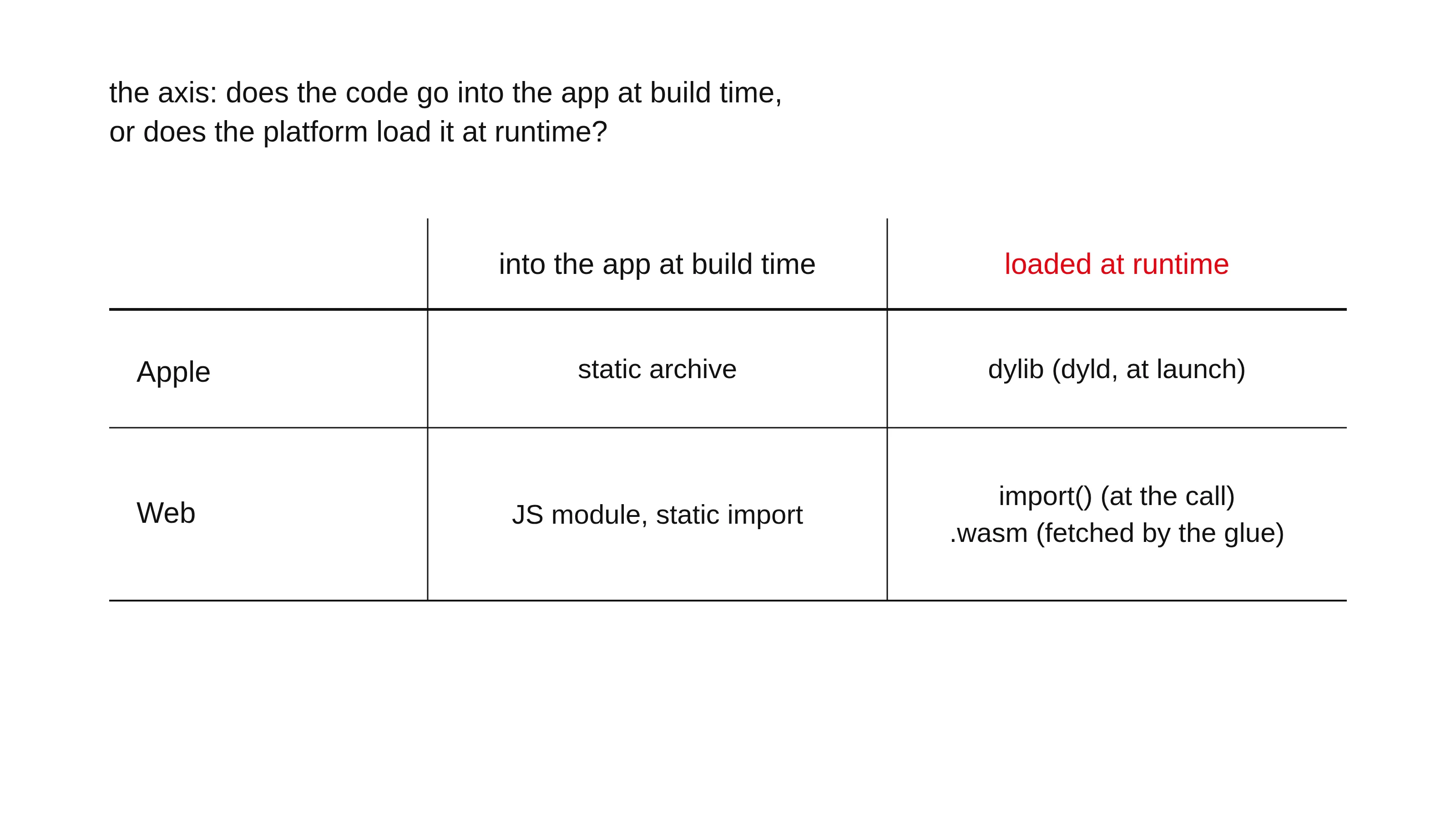
Every section answered the same question: does the code go into the app at build time, or does the platform load it at runtime?
On Apple, the answer is a file format: a static archive gives its object code to the linker, which copies it into the app. A dylib stays a file, and dyld loads it at launch. The isStatic flag picks the format.
On the web, the answer is an import: a static import puts the module into the app bundle at build time. A dynamic import() loads it at the call. A wasm binary loads at runtime through the glue file, every launch.
The target decides the artifact. The platform decides the loader. For the anatomy of the artifacts themselves, read the artifacts article.